The November Release is focused on delivering more powerful project and data management. We’ve provided the tools to make your workflow safer and more organized.
Want to see these features in action? Watch the full release video here:
Dynamic properties
Embed formulas directly into your project data. Define relationships between properties, by linking values or applying expressions, and let them update automatically whenever data changes.
Offset for quick adjustments
The new Offset tool lets you pull a line, boundary or surface outward or inward. Ideal for instant, clean geometry creation and rapid edits, zero extra steps required!
Work faster with shortcuts
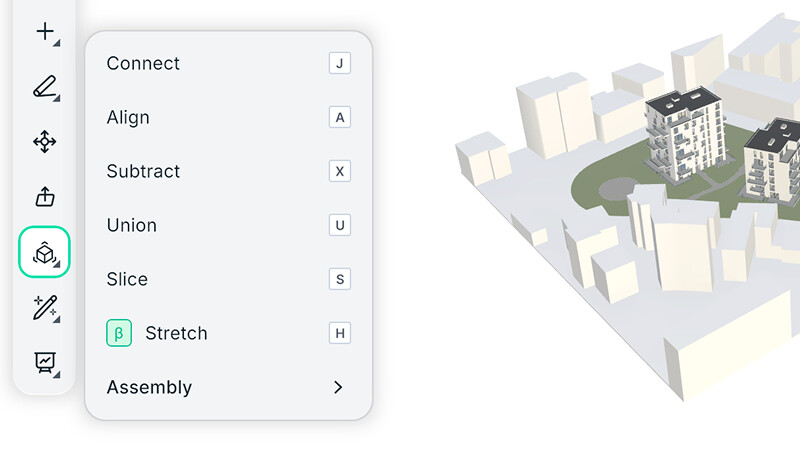
We added keyboard shortcuts so you can move through your workflow with fewer clicks. Perfect for speeding up everyday modelling tasks.
Project versioning
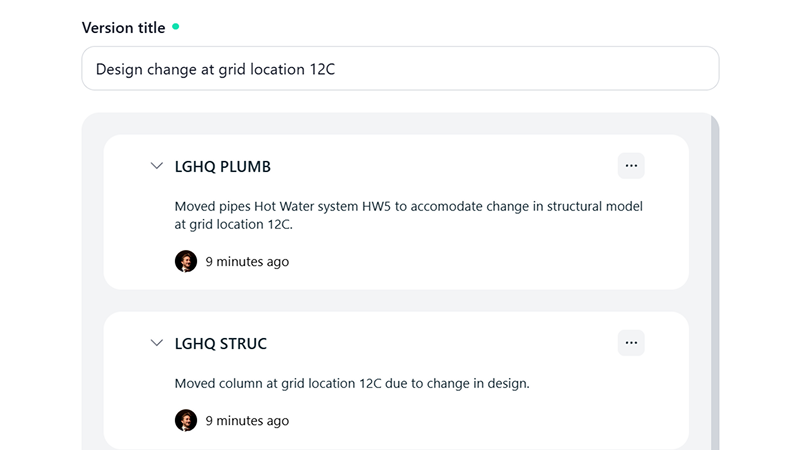
Project Versioning not only keeps a complete history of your changes, it now lets you publish updates across multiple models and project libraries in one single step. With Project Publish you can ensure that every part of your project stays aligned, while still being able to look back, compare, and restore earlier versions whenever needed.
Round edges in Push or Pull
Push or Pull now includes a Fillet option so you can round edges directly while you model. A flawless way to create clean, smooth transitions in your geometry with a single action.
Box Settings
Create elevation section boxes more easily and intuitively.
Dashboard
The dashboard has received a refresh to provide a better user experience for project management, team administration and settings configuration.
New Features
-
Create an inline library from Settings: Build and manage your library directly inside the dashboard settings.
-
Models overview page for project owners: Project owners now get one clear, comprehensive view of all models within their project.
-
New project members and settings structure: Experience a cleaner, more intuitive organization for permissions, members, and project settings.
Bug Fixes
- Clicking outside certain popups now works reliably.
- IFC export crash has been resolved.
- Fixed an issue where users with the same organisation name caused conflicts.
- Large member lists no longer break the “add model” dialog.
- Invite tokens are now passed correctly when opening shared links.
- Model version events are now received reliably.
- Reports correctly retrieve model names from inside modelVersions.
Other Improvements
We’ve implemented key optimizations across modelling, data, UI, and interoperability.
Modelling
- Section boxes are automatically generated during model import for immediate clarity.
- Better snapping behaviour on cylindrical shapes.
- Snapping after Slice is now reliable.
- Extrusion from horizontal surfaces is now supported.
- Improved detection of neighbouring elements when using Stretch.
- Openings are recognised more accurately.
- Copying selections correctly includes windows and doors.
- Improved handling of surface finishes such as coverings.
Data and Inspection
- Deep Inspect now shows Chalk Curves and boundaries for more geometric insight.
- Product and Deep Inspect panels update together so information is always in sync.
- Faster and clearer search results globally.
User Interface
- All input fields and controls now follow a unified, modern design.
- Discipline is now called Tag across the interface for consistency.
- Project owners can view and manage all models in the project from one place.
Import and Interoperability
-
Family instances translate more accurately when importing from Revit.
-
Dependent elements are exported as one Qonic product to avoid duplicates.
-
Dependent elements are handled correctly when syncing back to Revit.
-
Revit files are checked for edit permissions before import.
-
Spaces made of multiple shapes now export correctly.
Boundary and Geometry Fixes
-
Boundary selection works correctly on flat surfaces in translated models.
-
Non existing snap targets at the end of a Slice are fixed.
We are excited for you to experience these updates! Your feedback is our roadmap. Dive in, try the new Versioning and Shortcuts and let us know your triumphs via the feedback button!